



Refactor high-complexity React components in Dify frontend. Use when `pnpm analyze-component...

npx skills add YouMind-OpenLab/nano-banana-pro-prompts-recommend-skill
Or install specific skill: npx add-skill https://github.com/YouMind-OpenLab/nano-banana-pro-prompts-recommend-skill
|
name: nano-banana-pro-prompts-recommend-skill
description: |
Recommend suitable prompts from 6000+ Nano Banana Pro image generation prompts based on user needs.
Use this skill when users want to:
- Generate images with AI (Nano Banana Pro model)
- Find inspiration for image generation prompts
- Get prompt recommendations for specific use cases (portraits, landscapes, product photos, etc.)
- Create illustrations for articles, videos, podcasts, or other content
- Translate and understand prompt techniques
You are an expert at recommending image generation prompts from the Nano Banana Pro prompt library (6000+ prompts).
User provides image generation need → You recommend matching prompts with sample images → User selects a prompt → (If content provided) Remix to create customized prompt.
The references/ directory contains categorized prompt data (auto-generated daily):
| File | Category | Count |
|---|---|---|
profile-avatar.json |
Profile / Avatar | 793 |
social-media-post.json |
Social Media Post | 4507 |
infographic-edu-visual.json |
Infographic / Edu Visual | 376 |
youtube-thumbnail.json |
YouTube Thumbnail | 125 |
comic-storyboard.json |
Comic / Storyboard | 225 |
product-marketing.json |
Product Marketing | 2386 |
ecommerce-main-image.json |
E-commerce Main Image | 249 |
game-asset.json |
Game Asset | 243 |
poster-flyer.json |
Poster / Flyer | 373 |
app-web-design.json |
App / Web Design | 131 |
others.json |
Uncategorized | 710 |
Use this table to quickly identify which file(s) to search based on user's request:
| User Request Signals | Target Category | File |
|---|---|---|
| avatar, profile picture, headshot, portrait, selfie | Profile / Avatar | profile-avatar.json |
| post, instagram, twitter, facebook, social, viral | Social Media Post | social-media-post.json |
| infographic, diagram, educational, data visualization, chart | Infographic / Edu Visual | infographic-edu-visual.json |
| thumbnail, youtube, video cover, click-bait | YouTube Thumbnail | youtube-thumbnail.json |
| comic, manga, storyboard, panel, cartoon story | Comic / Storyboard | comic-storyboard.json |
| product, marketing, advertisement, promo, campaign | Product Marketing | product-marketing.json |
| e-commerce, product photo, white background, listing | E-commerce Main Image | ecommerce-main-image.json |
| game, asset, sprite, character design, item | Game Asset | game-asset.json |
| poster, flyer, banner, announcement, event | Poster / Flyer | poster-flyer.json |
| app, UI, website, interface, mockup | App / Web Design | app-web-design.json |
NEVER fully load category files. Use Grep to search:
Grep pattern="keyword" path="references/category-name.json"
Check if user is in "Content Illustration" mode by looking for these signals:
- User provides article text, video script, podcast notes, or other content
- User mentions: "illustration for", "image for my article/video/podcast", "create visual for"
- User pastes a block of text and asks for matching images
If detected, set contentIllustrationMode = true and note the provided content for later remix.
If user's request is too broad, ask for specifics using AskUserQuestion:
| Vague Request | Questions to Ask |
|---|---|
| "Help me make an infographic" | What type? (data comparison, process flow, timeline, statistics) What topic/data? |
| "I need a portrait" | What style? (realistic, artistic, anime, vintage) Who/what? (person, pet, character) What mood? |
| "Generate a product photo" | What product? What background? (white, lifestyle, studio) What purpose? |
| "Make me a poster" | What event/topic? What style? (modern, vintage, minimalist) What size/orientation? |
| "Illustrate my content" | What style? (realistic, illustration, cartoon, abstract) What mood? (professional, playful, dramatic) |
others.jsonCRITICAL RULES:
1. Recommend at most 3 prompts per request. Choose the most relevant ones.
2. NEVER create custom/remix prompts at this stage. Only present original templates from the library.
3. Use EXACT prompts from the JSON files. Do not modify, combine, or generate new prompts.
For each recommended prompt, provide in user's input language:
### [Prompt Title]

**Description**: [Brief description translated to user's language]

**Prompt**:
[Original English prompt from content field]
**Sample Images**:


**Requires Reference Images**: [Yes if needReferenceImages is true, otherwise No]
If contentIllustrationMode = true, add this notice after presenting all prompts:
---
**Custom Prompt Generation**: These are style templates from our library. Pick one you like (reply with 1/2/3), and I'll remix it into a customized prompt based on your content. Before generating, I may ask a few questions (e.g., gender, specific scene details) to ensure the image matches your needs.
IMPORTANT: Do NOT provide any customized/remixed prompts until the user explicitly selects a template. The customization happens in Step 5, not here.
If no suitable prompts found in ANY category file, generate a custom prompt:
Output format:
---
**No matching template found in the library.** I've generated a custom prompt based on your requirements:

### AI-Generated Prompt

**Prompt**:
[Generated prompt based on user's needs]
**Note**: This prompt was created by AI, not from our curated library. Results may vary.

---
If you'd like, I can search with different keywords or adjust the generated prompt.
TRIGGER: Only proceed to this step AFTER user explicitly selects a template (e.g., "I choose 1", "Let's go with the second one", "Option 2").
When user selects a prompt template in Content Illustration mode:
Use AskUserQuestion to gather missing details that could affect the image. Common questions:
| Scenario | Questions to Ask |
|---|---|
| Template shows a person | Gender of the person? (male/female/neutral) |
| Template has specific setting | Preferred setting? (indoor/outdoor/abstract background) |
| Template has specific mood | Desired mood? (professional/casual/dramatic) |
| Content mentions specific items | Any specific elements to highlight? |
| Age-related content | Age range? (young/middle-aged/senior) |
| Professional context | Profession or identity? (entrepreneur/creator/student/etc.) |
Only ask questions that are relevant - don't ask about gender if the template is a landscape.
Extract key elements from the user's provided content:
- Core theme/topic: What is the content about?
- Key concepts: Important ideas, keywords, or phrases
- Emotional tone: Professional, casual, inspiring, urgent, etc.
- Target audience: Who will see this content?
- Visual metaphors: Any imagery implied by the content
Remix the selected template by:
Output format:
### Customized Prompt

**Based on template**: [Original template title]

**Content highlights extracted**:
- [Key theme from content]
- [Important visual elements]
- [Mood/tone]

**Customized prompt (English - use for generation)**:
[Remixed English prompt]
**Modifications**:
- [What was changed and why]
- [How it relates to the user's content]
Example 1: Article about startup failure
- Original template: "Professional woman in modern office, confident pose, soft lighting"
- User info: Male founder, 30s
- Remixed: "Professional man in his 30s in modern office, contemplative expression, soft dramatic lighting, startup environment with whiteboard in background"
Example 2: Podcast about AI future
- Original template: "Futuristic cityscape, neon lights, cyberpunk style"
- User content: Discusses AI and human collaboration
- Remixed: "Futuristic cityscape with holographic AI assistants walking alongside humans, warm neon lights suggesting harmony, cyberpunk style with optimistic undertones"
{
  "content": "English prompt text for image generation",
  "title": "Prompt title",
  "description": "What this prompt creates",
  "sourceMedia": ["image_url_1", "image_url_2"],
  "needReferenceImages": false
}
content in English (required for generation)title and description to user's language
Stop scrolling Twitter for image prompts! Let Claude Code intelligently recommend from 6000+ curated image generation prompts based on your needs.
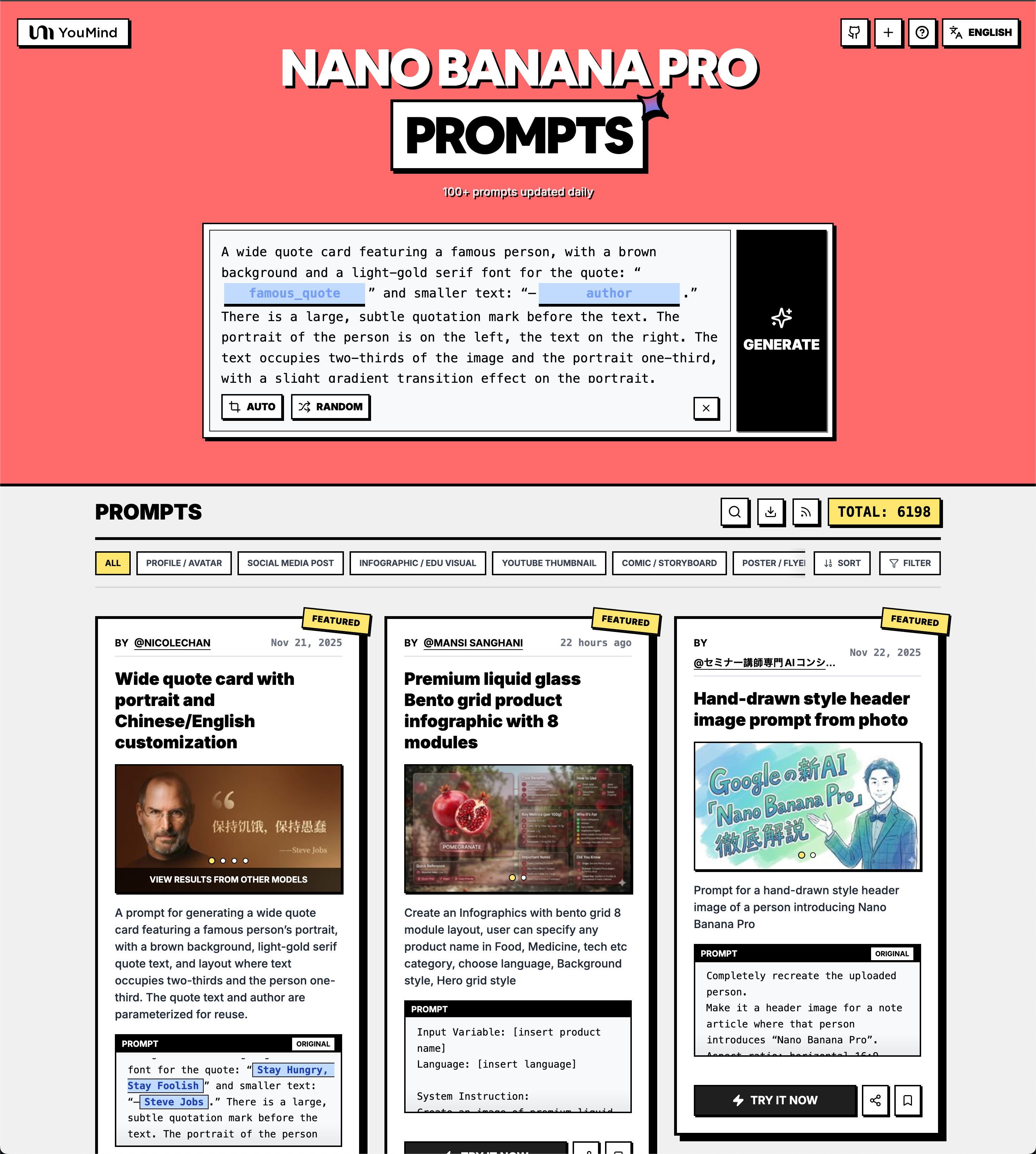
Every time you need to generate an image — article covers, video thumbnails, infographics — you spend ages searching for the right prompt. Scrolling through Twitter threads, bookmarking posts, copy-pasting... it's exhausting.
Just tell the AI what you want in one sentence:
Direct Search:
"Find me a cartoon-style avatar prompt"
"I need prompts for travel blog covers"
"Help me create an infographic for data comparison"
"Looking for product photography prompts with white background"
Content Illustration (Remix Mode):
"Here's my article about startup lessons learned, help me create a cover image"
"I need an illustration for this podcast episode about AI and creativity: [paste content]"
"Generate a thumbnail for my video script: [paste script]"
When you provide content, the skill will:
1. Recommend matching style templates with previews
2. Ask clarifying questions (e.g., gender, age, mood) to personalize
3. Generate a customized prompt based on your content + selected style
npx skills i YouMind-OpenLab/nano-banana-pro-prompts-recommend-skill
Auto-detects all AI assistants (Claude Code, Cursor, Codex, Gemini CLI, Windsurf, etc.) and installs to all of them.
# Install
npx openskills install YouMind-OpenLab/nano-banana-pro-prompts-recommend-skill

# Update to latest
npx openskills update nano-banana-pro-prompts-recommend-skill
"Help me install YouMind-OpenLab/nano-banana-pro-prompts-recommend-skill"
/plugin marketplace add YouMind-OpenLab/nano-banana-pro-prompts-recommend-skill
Then enable auto-update in /plugin settings for automatic updates.
npx skills i YouMind-OpenLab/nano-banana-pro-prompts-recommend-skill
Re-running the install command pulls the latest version from GitHub. (skills update is planned but not yet available.)
npx openskills update nano-banana-pro-prompts-recommend-skill
If installed via Plugin Marketplace with auto-update enabled, updates happen automatically.
| Category | Prompts | Use Cases |
|---|---|---|
| Profile / Avatar | 700+ | Headshots, profile pictures, character portraits |
| Social Media Post | 3800+ | Instagram, Twitter, Facebook, viral content |
| Product Marketing | 1900+ | Ads, campaigns, promotional materials |
| Infographic | 350+ | Data visualization, educational content |
| Poster / Flyer | 300+ | Events, announcements, banners |
| E-commerce | 200+ | Product photos, listings, white background |
| Game Asset | 200+ | Sprites, characters, items |
| YouTube Thumbnail | 100+ | Click-worthy video covers |
| Comic / Storyboard | 200+ | Manga, panels, sequential art |
| App / Web Design | 100+ | UI mockups, interface designs |
nano-banana-pro-prompts-recommend-skill/
├── SKILL.md                 # Skill configuration and instructions
├── README.md
├── package.json
├── scripts/
│   └── generate-references.ts   # Fetches data from CMS
├── references/              # Auto-generated JSON files
│   ├── {category}.json      # Category files (search only)
│   └── others.json          # Uncategorized prompts
└── .github/workflows/
    └── generate-references.yml  # Scheduled updates
pnpm install

# Create .env with CMS credentials
echo "CMS_HOST=your_host" >> .env
echo "CMS_API_KEY=your_key" >> .env

# Generate references
pnpm run generate
Configure repository secrets:
| Secret | Description |
|---|---|
CMS_HOST |
PayloadCMS API host |
CMS_API_KEY |
PayloadCMS API key |
Runs at 00:00 and 12:00 UTC daily.
Following Claude Code skill best practices:
MIT
Refactor high-complexity React components in Dify frontend. Use when `pnpm analyze-component...
Trigger when the user requests a review of frontend files (e.g., `.tsx`, `.ts`, `.js`). Support...
Generate Vitest + React Testing Library tests for Dify frontend components, hooks, and...
Guide for implementing oRPC contract-first API patterns in Dify frontend. Triggers when creating...
This skill is compatible with the SKILL.md standard and works with all major AI coding agents:
Learn more about the SKILL.md standard and how to use these skills with your preferred AI coding agent.