
Refactor high-complexity React components in Dify frontend. Use when `pnpm analyze-component...

npx skills add digitalsamba/digital-samba-skill
Or install specific skill: npx add-skill https://github.com/digitalsamba/digital-samba-skill
Build video conferencing integrations using Digital Samba's API and SDK. Use when creating meeting rooms, embedding video calls, generating participant tokens, managing recordings, or integrating real-time collaboration features. Triggers include "Digital Samba", "video conferencing API", "embed video calls", "meeting room integration", "WebRTC iframe", "participant tokens".
name: digital-samba
description: Build video conferencing integrations using Digital Samba's API and SDK. Use when creating meeting rooms, embedding video calls, generating participant tokens, managing recordings, or integrating real-time collaboration features. Triggers include "Digital Samba", "video conferencing API", "embed video calls", "meeting room integration", "WebRTC iframe", "participant tokens".
Build video conferencing into your applications using Digital Samba's prebuilt infrastructure. No WebRTC/Janus/TURN setup required.
curl -X POST https://api.digitalsamba.com/api/v1/rooms \
  -H "Authorization: Bearer {DEVELOPER_KEY}" \
  -H "Content-Type: application/json" \
  -d '{"friendly_url": "my-meeting", "privacy": "public"}'
const jwt = require('jsonwebtoken');

const token = jwt.sign({
  td: "team-uuid",      // Your team ID
  rd: "room-uuid",      // Room ID from step 1
  u: "John Doe",        // User display name
  role: "moderator"     // Optional: user role
}, DEVELOPER_KEY, { algorithm: 'HS256' });
Option A: Plain iframe — simplest, no SDK needed:
<iframe
  id="video-frame"
  allow="camera; microphone; display-capture; autoplay;"
  src="https://yourteam.digitalsamba.com/my-meeting?token={jwt}"
  style="width: 100%; height: 100vh; border: none;"
  allowfullscreen="true">
</iframe>
Option B: SDK creates the iframe — lets you add event listeners before loading:
import DigitalSambaEmbedded from '@digitalsamba/embedded-sdk';

// SDK injects an iframe into this container element
const sambaFrame = DigitalSambaEmbedded.createControl({
  url: 'https://yourteam.digitalsamba.com/my-meeting?token={jwt}',
  root: document.getElementById('video-container') // Container div, not an iframe
});

// Set up events before the iframe loads
sambaFrame.on('userJoined', (e) => console.log(`${e.data.name} joined`));
sambaFrame.on('connectionFailure', (e) => console.error('Failed:', e.data));

sambaFrame.load(); // Now create and load the iframe
Option C: SDK wraps an existing iframe — control an iframe you already placed in HTML:
import DigitalSambaEmbedded from '@digitalsamba/embedded-sdk';

// Wrap the iframe from Option A to add SDK control
const sambaFrame = DigitalSambaEmbedded.createControl({
  frame: document.getElementById('video-frame') // Existing iframe element
});

sambaFrame.on('userJoined', (e) => console.log(`${e.data.name} joined`));
Important: The SDK iframe container must have explicit CSS dimensions (width + height). The iframe does not auto-size. See Iframe Sizing in patterns.md.
| Need | Use |
|---|---|
| Create/delete rooms | REST API |
| User authentication | JWT tokens |
| Embed video UI | iframe + SDK |
| Start/stop recording | REST API or SDK |
| React to events | SDK events |
| Manage participants | REST API |
| Customize UI | Room settings API |
The skill includes ready-to-use code patterns for common use cases. Ask your AI assistant for a pattern by describing your use case (e.g., "build a virtual classroom", "add video to my booking system", "set up a webinar page").
| Pattern | Best For | Key Features |
|---|---|---|
| Simple Public Room | Quick demos, open meetings | Minimal setup, public access, no auth required |
| Authenticated Users | SaaS integrations, known users | JWT tokens, role-based access, error handling |
| SDK-Controlled Room | Custom UIs, programmatic control | Event handling, mute/unmute, custom buttons |
| Scheduled Meetings | Calendar integrations, booking systems | Time constraints, invite tokens, email invites |
| Webinar Mode | One-to-many broadcasts | Presenter/attendee roles, Q&A, raise hand |
| Recording & Playback | Content archiving, compliance | Start/stop recording, download, playback |
| Online Learning Platform | LMS, virtual classrooms, tutoring | Instructor/student roles, attendance tracking, lesson recordings, per-course rooms |
| Playwright E2E Testing | Automated testing, CI/CD | Iframe testing, SDK events, demo recordings |
Each pattern includes complete server-side and client-side code. See patterns.md for full implementations.
For detailed information, see these reference files:
Assign roles via JWT role field. Common roles:
- moderator - Full control (mute others, recording, etc.)
- speaker - Can present and speak
- attendee - View/listen only (configurable)
| Code | Meaning | Solution |
|---|---|---|
| 401 | Invalid/missing key | Check Authorization header |
| 403 | Insufficient permissions | Verify role/permissions |
| 404 | Room not found | Check room UUID/URL |
| 422 | Validation error | Check request body; see errors field for per-field details |
| 429 | Rate limited | Back off and retry with exponential delay |
| Issue | Cause | Solution |
|---|---|---|
| SDK won't load | Not a secure context | Serve over HTTPS (localhost exempt) — check window.isSecureContext |
connectionFailure event |
Invalid room URL, network error, or room deleted | Verify room exists and URL is correct |
appError event |
Runtime error (e.g., media permission denied) | Check e.data.code and e.data.message for details |
| iframe blank / no video | Missing allow attribute |
Add allow="camera; microphone; display-capture; autoplay" to iframe |
For detailed troubleshooting steps, diagnostic code examples, and API error breakdowns, see the Troubleshooting & Diagnostics section in patterns.md.
To check if your installed skill is up to date:
cat .claude/skills/digital-samba/VERSIONcurl -s https://api.github.com/repos/digitalsamba/digital-samba-skill/releases/latest | grep '"tag_name"'To update (submodule install):
git submodule update --remote .claude/skills/digital-samba
To update (manual install): Re-clone and copy skill files from https://github.com/digitalsamba/digital-samba-skill
 # Digital Samba Skill for AI Coding Agents
[](LICENSE)
[](https://docs.anthropic.com/en/docs/claude-code/skills)
[](https://github.com/digitalsamba/digital-samba-skill/releases)
AI-assisted development for embedding white-label video conferencing into your platform.
[Installation](#-installation) • [Usage](#-usage) • [Examples](#-code-examples) • [Resources](#-resources)
# Digital Samba Skill for AI Coding Agents
[](LICENSE)
[](https://docs.anthropic.com/en/docs/claude-code/skills)
[](https://github.com/digitalsamba/digital-samba-skill/releases)
AI-assisted development for embedding white-label video conferencing into your platform.
[Installation](#-installation) • [Usage](#-usage) • [Examples](#-code-examples) • [Resources](#-resources)
A skill gives your AI coding agent domain expertise. It's a set of markdown files that teach your AI agent about a specific API, SDK, or workflow. When you install this skill, your AI agent understands Digital Samba's video conferencing platform and can write integration code, explain concepts, and troubleshoot issues—without you having to paste documentation into every conversation.
Works with both Claude Code (CLI) and Claude Desktop.
Note: Skills install differently on each platform. Claude Code uses project-level folders (
.claude/skills/), while Claude Desktop uses a ZIP upload via Settings. We provide both methods below.
Building a telehealth app? Online learning platform? Virtual consultation service? This skill helps your AI agent assist you with integrating Digital Samba's video conferencing into your product.
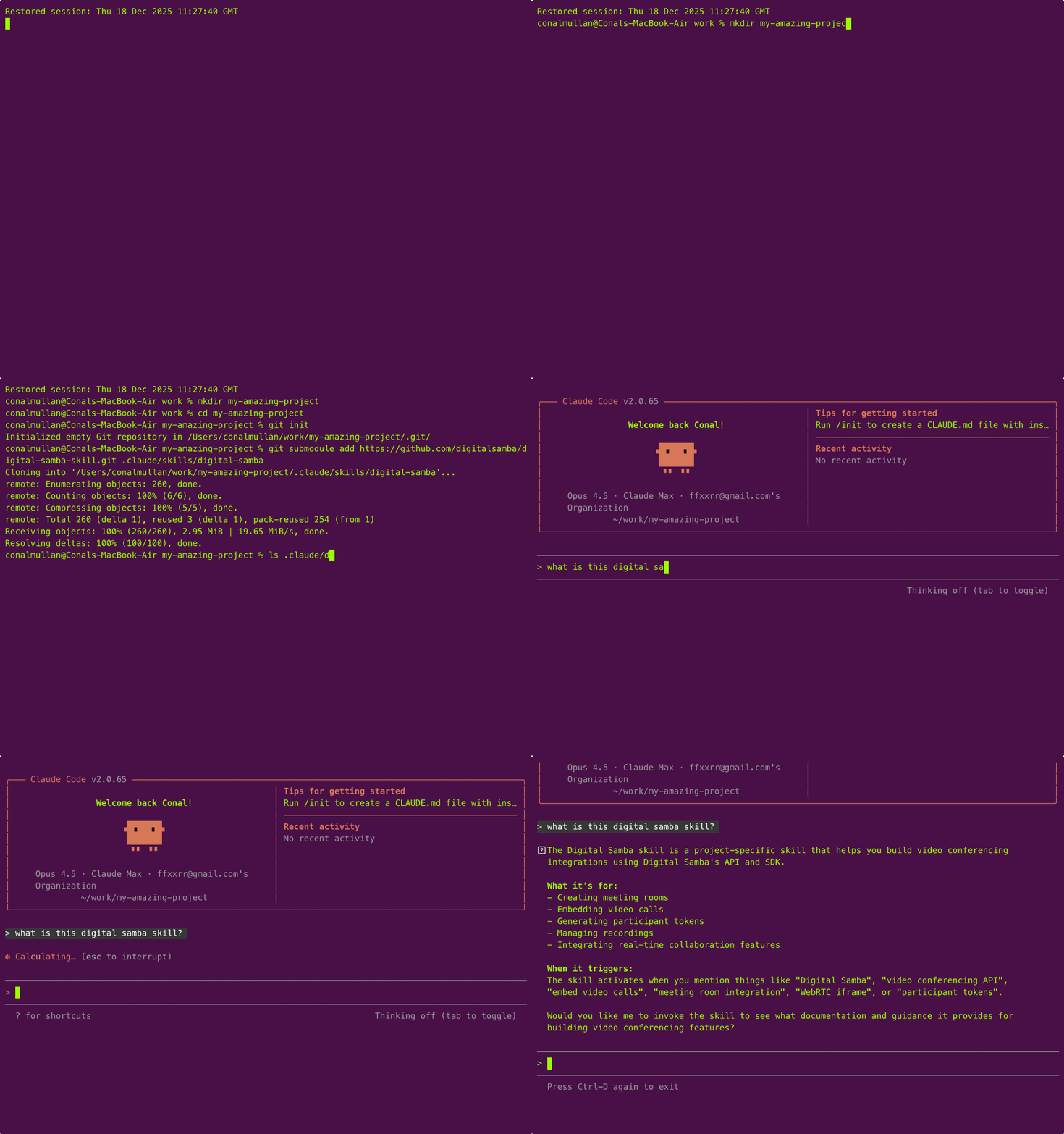
Option A: Git submodule (recommended) - Enables easy updates via git
cd your-project
git submodule add https://github.com/digitalsamba/digital-samba-skill.git .claude/skills/digital-samba
Option B: Manual copy
git clone https://github.com/digitalsamba/digital-samba-skill.git /tmp/ds-skill
mkdir -p your-project/.claude/skills/digital-samba
cp /tmp/ds-skill/{SKILL,api-reference,sdk-reference,patterns,jwt-tokens}.md /tmp/ds-skill/VERSION your-project/.claude/skills/digital-samba/
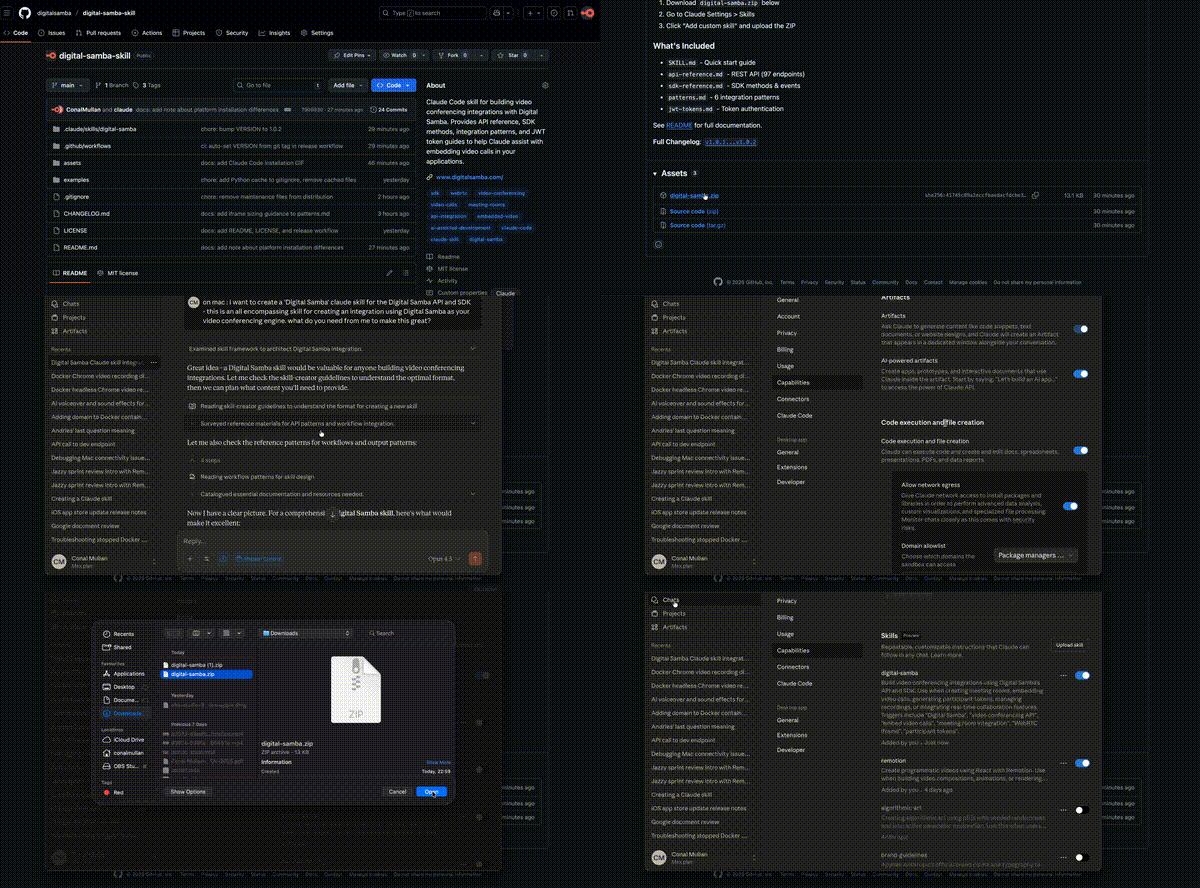
digital-samba.zip from ReleasesOnce installed, your AI agent understands Digital Samba's entire platform. Invoke the skill explicitly for best results:
"Using Digital Samba, build a telehealth video consultation system
with a waiting room, recording consent toggle, and post-call summary"

"Use the Digital Samba skill to create a virtual classroom with
breakout rooms for group exercises, a Q&A panel, and attendance tracking"

"Using Digital Samba, add video depositions to my legal platform
with recording, timestamped bookmarks, and transcript export"
"Use Digital Samba to create a React component that displays
participant video tiles with mute indicators, and lets moderators remove users"

"Using the Digital Samba skill, build a Node.js service that provisions
rooms on-demand, generates secure tokens, and cleans up after 24 hours"

"Use Digital Samba to set up webhook handlers that save recordings
to S3 and email users when their transcript is ready"
"Help me debug my Digital Samba JWT tokens - here's my code, what's wrong?"

"Using Digital Samba, why are users joining with the wrong role?"

"My Digital Samba iframe isn't filling its container - how do I fix the CSS?"
"Using Digital Samba, what's the difference between public and private rooms?"

"Explain how Digital Samba breakout rooms work and show me the API calls"

"Use the Digital Samba skill to help me implement GDPR-compliant recording consent"
Tip: Start prompts with "Using Digital Samba..." or "Use the Digital Samba skill to..." for reliable activation.
| File | Description |
|---|---|
SKILL.md |
Quick start guide and overview |
api-reference.md |
Complete REST API reference (97 endpoints) |
sdk-reference.md |
SDK methods, events, and properties |
patterns.md |
Integration patterns + iframe sizing guide |
jwt-tokens.md |
Token authentication and user identity |
The examples/ directory contains ready-to-use code for common integration scenarios:
| File | Description |
|---|---|
basic-room.js |
Room provisioning (create, token, list, delete) |
webhook-handler.js |
Express server for processing room events |
| File | Description |
|---|---|
useDigitalSamba.ts |
Custom hook with connection state management |
VideoCall.tsx |
Drop-in video call component |
| File | Description |
|---|---|
basic_room.py |
Room management with requests + PyJWT |
webhook_handler.py |
FastAPI webhook endpoint |
| Resource | Link |
|---|---|
| REST API Docs | developer.digitalsamba.com/rest-api |
| SDK on NPM | @digitalsamba/embedded-sdk |
| Dashboard | dashboard.digitalsamba.com |
| Support | support.digitalsamba.com |
We update this skill when Digital Samba releases new API endpoints or SDK features.
Check for updates: Ask your AI agent "Is my Digital Samba skill up to date?" - it knows how to check.
To update:
| Install Method | Update Command |
|---|---|
| Submodule | git submodule update --remote .claude/skills/digital-samba |
| Manual copy | Re-run the install commands above |
| Claude Desktop | Download latest ZIP from Releases and re-upload |
Get notified: Click "Watch" → "Releases only" on this repo to receive update notifications.
MIT License - see LICENSE for details.
Contributions welcome! Please open an issue or submit a PR.
Refactor high-complexity React components in Dify frontend. Use when `pnpm analyze-component...
Trigger when the user requests a review of frontend files (e.g., `.tsx`, `.ts`, `.js`). Support...
Generate Vitest + React Testing Library tests for Dify frontend components, hooks, and...
Guide for implementing oRPC contract-first API patterns in Dify frontend. Triggers when creating...
This skill is compatible with the SKILL.md standard and works with all major AI coding agents:
Learn more about the SKILL.md standard and how to use these skills with your preferred AI coding agent.