
Refactor high-complexity React components in Dify frontend. Use when `pnpm analyze-component...

npx skills add jalpp/chessagine.skill
Or install specific skill: npx add-skill https://github.com/jalpp/chessagine.skill
Comprehensive chess analysis using the ChessAgine MCP. Use this skill when users request chess-related tasks including analyzing positions or games, studying openings, finding best moves, comparing with master/computer games, solving puzzles, building repertoires, reviewing user games from Lichess or Chessboard Magic, or any chess related request. Triggers on chess positions (FEN), PGN games, Lichess URLs, opening names, or general chess requests.
name: chessagine
description: Comprehensive chess analysis using the ChessAgine MCP. Use this skill when users request chess-related tasks including analyzing positions or games, studying openings, finding best moves, comparing with master/computer games, solving puzzles, building repertoires, reviewing user games from Lichess or Chessboard Magic, or any chess related request. Triggers on chess positions (FEN), PGN games, Lichess URLs, opening names, or general chess requests.
license: MIT
metadata:
author: jalpp
version: "0.0.2"
ChessAgine provides comprehensive chess analysis through 40+ specialized tools integrating Stockfish, Leela Chess Zero, Maia2, Lichess, Chessboard Magic, and multiple chess databases.
Every position analysis must include visualization using generate-chess-board-view-artificat-html (2D default) or generate-dynamic-gameview-html (for games with move navigation).
For important positions, combine multiple data sources:
- Opening database (fast orientation)
- Engine analysis (best moves)
- Master games (practical validation)
- TCEC/Correspondence (computer/deep human perspective)
Start with quick overview, deepen analysis only where critical:
- Quick check: depth 15-18
- Standard analysis: depth 20-22
- Critical positions: depth 25-30
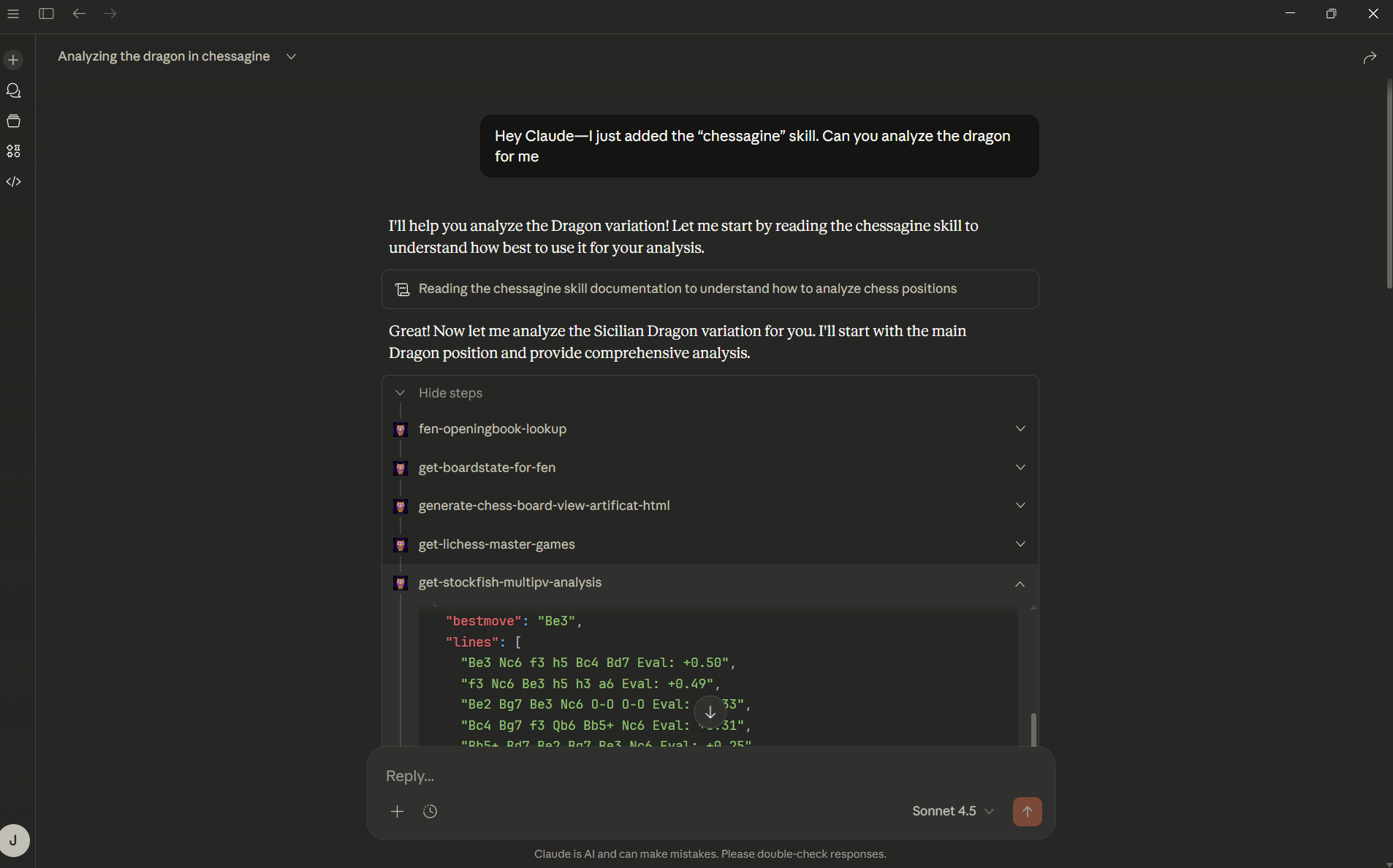
get-boardstate-for-fen (understand position)generate-chess-board-view-artificat-html (visualize)get-stockfish-multipv-analysis (3 lines, depth 22)fen-openingbook-lookup (if opening)get-lichess-master-games (master practice)get-chess-knowledgebasefetch-lichess-game (get PGN)parse-pgn-into-fens (extract positions)get-stockfish-analysis on critical positions (depth 20)generate-dynamic-gameview-html (navigable game view)fen-openingbook-lookup (identify opening, common moves)get-lichess-master-games (master statistics)get-chessboardmagic-tcec-stats (computer evaluation)get-stockfish-multipv-analysis (5 lines, depth 25)get-stockfish-best-move (tactical solution)get-stockfish-multipv-analysis (alternatives, 3 lines)get-chessdb-analysisget-chess-knowledgebase principlesget-puzzle-themes (show available themes)fetch-chess-puzzle (with theme/rating filters)generate-chess-board-view-artificat-html (present)get-stockfish-best-move (verify)get-stockfish-analysis - Tactical evaluation (depth 18-25)get-stockfish-multipv-analysis - Show alternatives (3-5 lines)get-stockfish-best-move - Quick best move without full analysisget-leela-analysis - Strategic/positional evaluationget-elite-leela-analysis - Master-level positional understandingget-maia2-analysis - Human-like moves at specific rating (1100-1900)get-chessdb-analysis - Large database position lookupfen-openingbook-lookup - Fast lookup in 12k position databaseget-lichess-master-games - Grandmaster game statisticsget-chessboardmagic-tcec-stats - Top computer engine statisticsget-chessboardmagic-corr-stats - Correspondence chess statisticsfetch-lichess-game - Get game PGN from Lichessfetch-lichess-games - User's 20 most recent gamesget-chessboardmagic-games - User's Chessboard Magic gamesget-chessboardmagic-game-details - Detailed single gameparse-pgn-into-fens - Convert PGN to FEN listget-fen-map-lookup - Map moves to FENsget-stockfish-batch-analysis - Analyze multiple positionsgenerate-chess-board-view-artificat-html - Single position (2D/3D)generate-dynamic-gameview-html - Full game with navigationis-legal-move - Check move legality (SAN or UCI)get-boardstate-for-move - Get resulting positionget-boardstate-for-fen - Describe current positionfetch-chess-puzzle - Random puzzle (filterable)get-puzzle-themes - Available puzzle themesget-chess-knowledgebase - Silman Imbalances, Fine's principles, endgame rulesget-chessagine-stater-prompts - Example analysis promptsget-chessboardmagic-repertoires - User's repertoire listget-chessboardmagic-repertoire-details - Detailed repertoire linesfetch-lichess-studies - User's Lichess studiesfetch-lichess-study-pgn - Specific study in PGNget-lichess-username - Current user's Lichess username| User Request | Workflow |
|---|---|
| "Analyze this position [FEN]" | Position Deep Dive (see references/workflow_patterns.md) |
| "Analyze my last game" | Get Lichess username → Fetch recent games → Analyze selected game |
| "What's the best move?" | Quick best move + alternatives + explanation |
| "Help me study the Sicilian" | Opening study workflow with multiple databases |
| "I'm stuck in this endgame" | Endgame analysis + knowledgebase principles |
| Lichess URL provided | Parse game ID → Fetch game → Full analysis |
| "Give me a tactics puzzle" | Puzzle training session with explanations |
For detailed guidance on:
- Workflow patterns: See references/workflow_patterns.md
- Tool selection: See references/tool_selection.md
- API parameters: See references/api_reference.md
- Chess knowledge: See references/chess_knowledgebase.md
is-legal-move before analysisThe ChessAgine skill enables Claude to be a chess buddy and analyst by leveraging 40+ specialized tools from the ChessAgine MCP server.
chessagine-v0.0.2.skill from this repositorychessagine.skill fileSimply ask Claude about chess:
With ChessAgine position analysis skill + MCP server Claude can analyze chess positions
@jalpp
Refactor high-complexity React components in Dify frontend. Use when `pnpm analyze-component...
Trigger when the user requests a review of frontend files (e.g., `.tsx`, `.ts`, `.js`). Support...
Generate Vitest + React Testing Library tests for Dify frontend components, hooks, and...
Guide for implementing oRPC contract-first API patterns in Dify frontend. Triggers when creating...
This skill is compatible with the SKILL.md standard and works with all major AI coding agents:
Learn more about the SKILL.md standard and how to use these skills with your preferred AI coding agent.