





Refactor high-complexity React components in Dify frontend. Use when `pnpm analyze-component...

npx skills add BayramAnnakov/claude-reflect
Or install specific skill: npx add-skill https://github.com/BayramAnnakov/claude-reflect
Self-learning system that captures corrections during sessions and reminds users to run /reflect to update CLAUDE.md. Use when discussing learnings, corrections, or when the user mentions remembering something for future sessions.
name: claude-reflect
description: Self-learning system that captures corrections during sessions and reminds users to run /reflect to update CLAUDE.md. Use when discussing learnings, corrections, or when the user mentions remembering something for future sessions.
A two-stage system that helps Claude Code learn from user corrections.
Stage 1: Capture (Automatic)
Hooks detect correction patterns ("no, use X", "actually...", "use X not Y") and queue them to ~/.claude/learnings-queue.json.
Stage 2: Process (Manual)
User runs /reflect to review and apply queued learnings to CLAUDE.md files.
| Command | Purpose |
|---|---|
/reflect |
Process queued learnings with human review |
/reflect --scan-history |
Scan past sessions for missed learnings |
/reflect --dry-run |
Preview changes without applying |
/reflect-skills |
Discover skill candidates from repeating patterns |
/skip-reflect |
Discard all queued learnings |
/view-queue |
View pending learnings without processing |
Remind users about /reflect when:
- They complete a feature or meaningful work unit
- They make corrections you should remember for future sessions
- They explicitly say "remember this" or similar
- Context is about to compact and queue has items
High-confidence corrections:
- Tool rejections (user stops an action with guidance)
- "no, use X" / "don't use Y"
- "actually..." / "I meant..."
- "use X not Y" / "X instead of Y"
- "remember:" (explicit marker)
~/.claude/CLAUDE.md - Global learnings (model names, general patterns)./CLAUDE.md - Project-specific learnings (conventions, tools, structure)commands/*.md - Skill improvements (corrections during skill execution)User: no, use gpt-5.1 not gpt-5 for reasoning tasks
Claude: Got it, I'll use gpt-5.1 for reasoning tasks.
[Hook captures this correction to queue]
User: /reflect
Claude: Found 1 learning queued. "Use gpt-5.1 for reasoning tasks"
Scope: global
Apply to ~/.claude/CLAUDE.md? [y/n]
A self-learning system for Claude Code that captures corrections and discovers workflow patterns — turning them into permanent memory and reusable skills.
When you correct Claude ("no, use gpt-5.1 not gpt-5"), it remembers forever.
┌─────────────────┐     ┌─────────────────┐     ┌─────────────────┐
│  You correct    │ ──► │  Hook captures  │ ──► │  /reflect adds  │
│  Claude Code    │     │  to queue       │     │  to CLAUDE.md   │
└─────────────────┘     └─────────────────┘     └─────────────────┘
      (automatic)            (automatic)            (manual review)
Analyzes your session history to find repeating tasks that could become reusable commands.
┌─────────────────┐     ┌─────────────────┐     ┌─────────────────┐
│  Your past      │ ──► │ /reflect-skills │ ──► │   Generates     │
│  sessions       │     │ finds patterns  │     │   /commands     │
└─────────────────┘     └─────────────────┘     └─────────────────┘
    (68 sessions)         (AI-powered)            (you approve)
Example: You've asked "review my productivity" 12 times → suggests creating /daily-review
| Feature | What it does |
|---|---|
| Permanent Memory | Corrections sync to CLAUDE.md — Claude remembers across sessions |
| Skill Discovery | Finds repeating patterns in your history → generates commands |
| Multi-language | AI understands corrections in any language |
| Skill Improvement | Corrections during /deploy improve the deploy skill itself |
# Add the marketplace
claude plugin marketplace add bayramannakov/claude-reflect

# Install the plugin
claude plugin install claude-reflect@claude-reflect-marketplace

# IMPORTANT: Restart Claude Code to activate the plugin
After installation, restart Claude Code (exit and reopen). Then hooks auto-configure and commands are ready.
First run? When you run
/reflectfor the first time, you'll be prompted to scan your past sessions for learnings.
| Command | Description |
|---|---|
/reflect |
Process queued learnings with human review |
/reflect --scan-history |
Scan ALL past sessions for missed learnings |
/reflect --dry-run |
Preview changes without applying |
/reflect --targets |
Show detected config files (CLAUDE.md, AGENTS.md) |
/reflect --review |
Show queue with confidence scores and decay status |
/reflect --dedupe |
Find and consolidate similar entries in CLAUDE.md |
/reflect --include-tool-errors |
Include tool execution errors in scan |
/reflect-skills |
Discover skill candidates from repeating patterns |
/reflect-skills --days N |
Analyze last N days (default: 14) |
/reflect-skills --project <path> |
Analyze specific project |
/reflect-skills --all-projects |
Scan all projects for cross-project patterns |
/reflect-skills --dry-run |
Preview patterns without generating skill files |
/skip-reflect |
Discard all queued learnings |
/view-queue |
View pending learnings without processing |
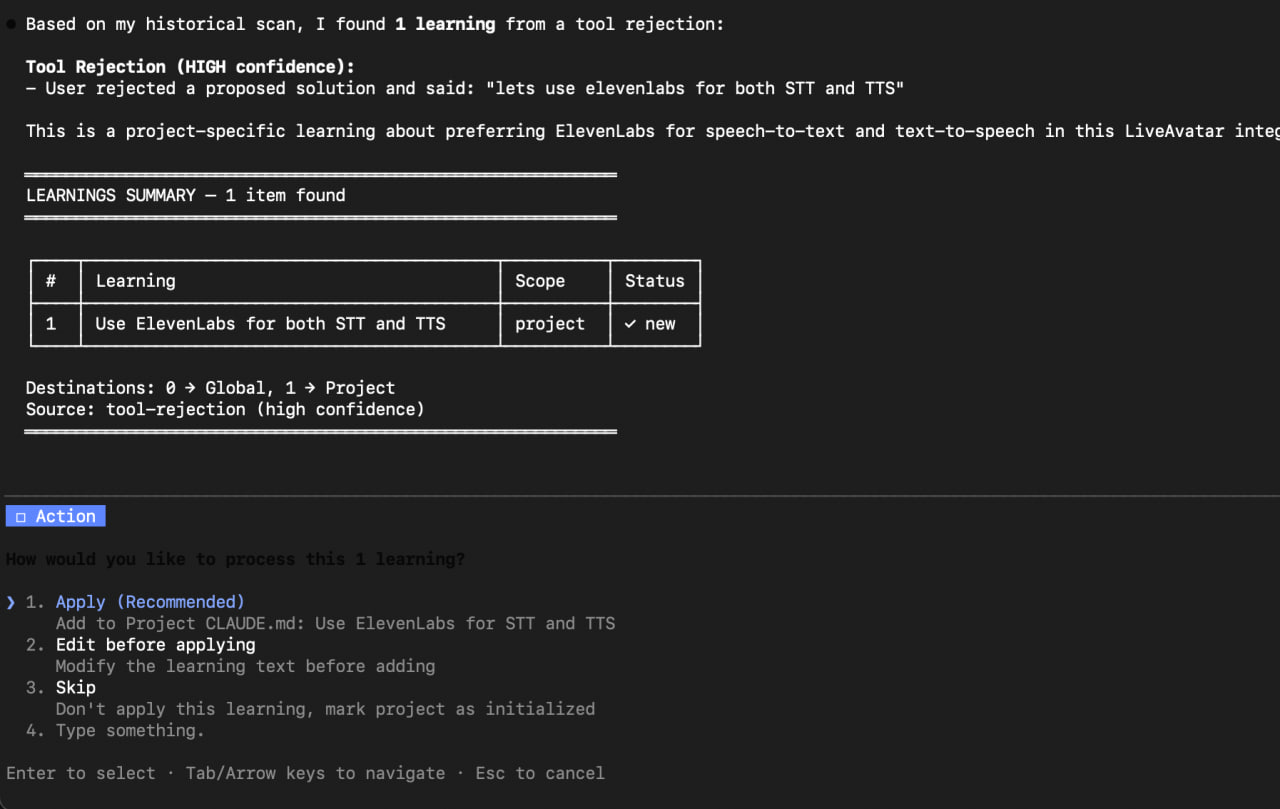
Stage 1: Capture (Automatic)
Hooks run automatically to detect and queue corrections:
| Hook | Trigger | Purpose |
|---|---|---|
session_start_reminder.py |
Session start | Shows pending learnings reminder |
capture_learning.py |
Every prompt | Detects correction patterns and queues them |
check_learnings.py |
Before compaction | Backs up queue and informs user |
post_commit_reminder.py |
After git commit | Reminds to run /reflect after completing work |
Stage 2: Process (Manual)
Run /reflect to review and apply queued learnings to CLAUDE.md.
Claude-reflect uses a hybrid detection approach:
1. Regex patterns (real-time capture)
Fast pattern matching during sessions detects:
"no, use X" / "don't use Y" / "actually..." / "that's wrong""Perfect!" / "Exactly right" / "Great approach""remember:" — highest confidence2. Semantic AI validation (during /reflect)
When you run /reflect, an AI-powered semantic filter:
- Multi-language support — understands corrections in any language
- Better accuracy — filters out false positives from regex
- Cleaner learnings — extracts concise, actionable statements
Example: A Spanish correction like "no, usa Python" is correctly detected even though it doesn't match English patterns.
Each captured learning has a confidence score (0.60-0.95). The final score is the higher of regex and semantic confidence.
When you run /reflect, Claude presents a summary table with options:
- Apply - Accept the learning and add to CLAUDE.md
- Edit before applying - Modify the learning text first
- Skip - Don't apply this learning
Approved learnings are synced to:
- ~/.claude/CLAUDE.md (global - applies to all projects)
- ./CLAUDE.md (project-specific)
- ./**/CLAUDE.md (subdirectories - auto-discovered)
- ./.claude/commands/*.md (skill files - when correction relates to a skill)
- AGENTS.md (if exists - works with Codex, Cursor, Aider, Jules, Zed, Factory)
Run /reflect --targets to see which files will be updated.
Run /reflect-skills to discover repeating patterns in your sessions that could become reusable skills:
/reflect-skills                 # Analyze current project (last 14 days)
/reflect-skills --days 30       # Analyze last 30 days
/reflect-skills --all-projects  # Analyze all projects (slower)
/reflect-skills --dry-run       # Preview patterns without generating files
Features:
- AI-powered detection — uses reasoning, not regex, to find patterns
- Semantic similarity — detects same intent across different phrasings
- Project-aware — groups patterns by project, suggests correct location
- Smart assignment — asks where each skill should go (project vs global)
- Generates skill files — creates draft skills in .claude/commands/
How it works:
The skill discovers patterns by analyzing your session history semantically. Different phrasings of the same intent are recognized:
Session 1: "review my productivity for today"
Session 2: "how was my focus this afternoon?"
Session 3: "check my ActivityWatch data"
Session 4: "evaluate my work hours"
Claude reasons: "These 4 requests have the same intent - reviewing productivity data. The workflow is: fetch time tracking data → categorize activities → calculate focus score. This is a strong candidate for /daily-review."
Example output:
════════════════════════════════════════════════════════════
SKILL CANDIDATES DISCOVERED
════════════════════════════════════════════════════════════

Found 2 potential skills from analyzing 68 sessions:

1. /daily-review (High) — from my-productivity-tools
   → Review productivity using time tracking data
   Evidence: 15 similar requests
   Corrections learned: "use local timezone", "chat apps can be work"

2. /deploy-app (High) — from my-webapp
   → Deploy application with pre-flight checks
   Evidence: 10 similar requests
   Corrections learned: "always run tests first"

════════════════════════════════════════════════════════════

Which skills should I generate?
> [1] /daily-review, [2] /deploy-app

Where should each skill be created?
┌──────────────────────┬─────────────────────────┐
│ /daily-review        │ my-productivity-tools   │
│ /deploy-app          │ my-webapp               │
└──────────────────────┴─────────────────────────┘

Skills created:
  ~/projects/my-productivity-tools/.claude/commands/daily-review.md
  ~/projects/my-webapp/.claude/commands/deploy-app.md
Generated skill file example:
---
description: Deploy application with pre-flight checks
allowed-tools: Bash, Read, Write
---

## Context
Deployment scripts in ./scripts/deploy/

## Your Task
Deploy the application to the specified environment.

### Steps
1. Run test suite
2. Build production assets
3. Deploy to target environment
4. Verify deployment health

### Guardrails
- Always run tests before deploying
- Never deploy to production on Fridays
- Check for pending migrations

---
*Generated by /reflect-skills from 10 session patterns*
When you correct Claude while using a skill (e.g., /deploy), the correction can be routed back to the skill file itself:
User: /deploy
Claude: [deploys without running tests]
User: "no, always run tests before deploying"

→ /reflect detects this relates to /deploy
→ Offers to add learning to .claude/commands/deploy.md
→ Skill file updated with new step
This makes skills smarter over time, not just CLAUDE.md.
If you see errors like "Duplicate hooks file detected" or "No such file or directory" after updating, you need to clear the plugin cache. This is due to known Claude Code caching issues:
- #14061 - /plugin update doesn't invalidate cache
- #15369 - Uninstall doesn't clear cached files
# 1. Uninstall the plugin
claude plugin uninstall claude-reflect@claude-reflect-marketplace

# 2. Clear both caches (required!)
rm -rf ~/.claude/plugins/marketplaces/claude-reflect-marketplace
rm -rf ~/.claude/plugins/cache/claude-reflect-marketplace

# 3. Exit Claude Code completely (restart terminal or close app)

# 4. Reinstall
claude plugin install claude-reflect@claude-reflect-marketplace
For normal updates (when no cache issues):
# Use the /plugin menu in Claude Code
/plugin
# Select "Update now" for claude-reflect
claude plugin uninstall claude-reflect@claude-reflect-marketplace
claude-reflect/
├── .claude-plugin/
│   └── plugin.json         # Plugin manifest (auto-registers hooks)
├── commands/
│   ├── reflect.md          # Main command
│   ├── reflect-skills.md   # Skill discovery
│   ├── skip-reflect.md     # Discard queue
│   └── view-queue.md       # View queue
├── hooks/
│   └── hooks.json          # Auto-configured when plugin installed
├── scripts/
│   ├── lib/
│   │   ├── reflect_utils.py      # Shared utilities
│   │   └── semantic_detector.py  # AI-powered semantic analysis
│   ├── capture_learning.py       # Hook: detect corrections
│   ├── check_learnings.py        # Hook: pre-compact check
│   ├── post_commit_reminder.py   # Hook: post-commit reminder
│   ├── compare_detection.py      # Compare regex vs semantic detection
│   ├── extract_session_learnings.py
│   ├── extract_tool_errors.py
│   ├── extract_tool_rejections.py
│   └── legacy/                   # Bash scripts (deprecated)
├── tests/                  # Test suite
└── SKILL.md                # Skill context for Claude
First time using claude-reflect? Run:
/reflect --scan-history
This scans all your past sessions for corrections you made, so you don't lose learnings from before installation.
Claude filters out:
- Questions (not corrections)
- One-time task instructions
- Context-specific requests
- Vague/non-actionable feedback
Only reusable learnings are kept.
Before adding a learning, existing CLAUDE.md content is checked. If similar content exists, you can:
- Merge with existing entry
- Replace the old entry
- Skip the duplicate
Over time, CLAUDE.md can accumulate similar entries. Run /reflect --dedupe to:
- Find semantically similar entries (even with different wording)
- Propose consolidated versions
- Clean up redundant learnings
Example:
Before:
  - Use gpt-5.1 for complex tasks
  - Prefer gpt-5.1 for reasoning
  - gpt-5.1 is better for hard problems

After:
  - Use gpt-5.1 for complex reasoning tasks
Use explicit markers for important learnings:
remember: always use venv for Python projects
Run /reflect after git commits - The hook reminds you, but make it a habit
Historical scan on new machines - When setting up a new dev environment:
/reflect --scan-history --days 90
Project vs Global - Model names and general patterns go global; project-specific conventions stay in project CLAUDE.md
Discover skills monthly - Run /reflect-skills --days 30 monthly to find automation opportunities you might have missed
Skills get smarter - When you correct Claude during a skill, that correction can be routed back to the skill file itself via /reflect
Pull requests welcome! Please read the contributing guidelines first.
MIT
Refactor high-complexity React components in Dify frontend. Use when `pnpm analyze-component...
Trigger when the user requests a review of frontend files (e.g., `.tsx`, `.ts`, `.js`). Support...
Generate Vitest + React Testing Library tests for Dify frontend components, hooks, and...
Guide for implementing oRPC contract-first API patterns in Dify frontend. Triggers when creating...
This skill is compatible with the SKILL.md standard and works with all major AI coding agents:
Learn more about the SKILL.md standard and how to use these skills with your preferred AI coding agent.