
Refactor high-complexity React components in Dify frontend. Use when `pnpm analyze-component...

npx skills add tzockoll-creator/Strategy-Enterprise-Command-Center-Plug-in
Or install specific skill: npx add-skill https://github.com/tzockoll-creator/Strategy-Enterprise-Command-Center-Plug-in
Multi-agent orchestration skill that coordinates parallel analysis across Strategy Cloud's ecosystem—Excel data, semantic layer queries, and live dashboards—then synthesizes findings and routes actions to enterprise tools (Asana, HubSpot, Slack, Jira, Confluence, Canva, Figma). Use when running comprehensive business reviews, correlating dashboard visuals with semantic layer data, analyzing supplemental Excel data alongside Strategy Cloud metrics, creating LOB-specific action items from multi-source insights, or demonstrating enterprise AI orchestration capabilities.
name: enterprise-command-center
description: Multi-agent orchestration skill that coordinates parallel analysis across Strategy Cloud's ecosystem—Excel data, semantic layer queries, and live dashboards—then synthesizes findings and routes actions to enterprise tools (Asana, HubSpot, Slack, Jira, Confluence, Canva, Figma). Use when running comprehensive business reviews, correlating dashboard visuals with semantic layer data, analyzing supplemental Excel data alongside Strategy Cloud metrics, creating LOB-specific action items from multi-source insights, or demonstrating enterprise AI orchestration capabilities.
Multi-agent orchestration skill for Claude that coordinates business intelligence analysis across Strategy Cloud and routes actionable insights to enterprise tools.
Single prompt → Multiple Strategy queries → 7 enterprise tools updated

"Run my weekly business ops review"
                │
                ▼
    ┌───────────────────────┐
    │   STRATEGY MCP        │──→ HubSpot (deal risk scores, tasks)
    │   (Semantic Layer)    │──→ Jira (blocker issues)
    │                       │──→ Confluence (investigation pages)
    │                       │──→ Asana (LOB tasks)
    └───────────────────────┘
                │
                ▼
    ┌───────────────────────┐
    │   STRATEGY ANALYST    │──→ Slack (executive summary)
    │   (Visual Dashboard)  │──→ Canva (QBR presentation)
    │                       │──→ Figma (dashboard mockup)
    └───────────────────────┘
When this skill is invoked, execute the following rounds of intelligence gathering and action routing:
Query Strategy for:
- Pipeline velocity and deal progression
- At-risk deals (stalled >14 days, missing next steps)
- Revenue signals and forecast accuracy
- Win/loss patterns by segment
Route findings to:
- HubSpot: Update deal properties with risk scores, create follow-up tasks for at-risk deals
- Asana: Create tasks for sales leadership with specific deal actions
Reasoning checkpoint: After completing Round 1, articulate what operational data is needed next: "Now I need operational data to identify delivery risks that could impact these deals..."
Query Strategy for:
- Active blockers and escalations
- SLA compliance status
- Resource capacity and utilization
- Project delivery timelines
Route findings to:
- Jira: Create issues for blockers requiring engineering attention
- Confluence: Create investigation pages for complex issues needing documentation
- Asana: Create tasks for operations team with priority assignments
Reasoning checkpoint: "Now reviewing visual dashboards for patterns not captured in structured queries..."
Analyze dashboards for:
- Visual anomalies and trend breaks
- Cross-LOB patterns
- Leading indicators
- Month-over-month comparisons
Route findings to:
- Slack: Post executive summary to leadership channel
- Canva: Generate QBR presentation with key findings
- Figma: Update dashboard mockup with annotations
The skill expects the following environment context (set in project instructions or environment):
STRATEGY_MCP_URL: "your-strategy-mcp-endpoint"
STRATEGY_DASHBOARD_URL: "your-strategy-cloud-url"
STRATEGY_DASHBOARD_NAME: "Executive Dashboard"
JIRA_PROJECT_KEY: "DEMO"
CONFLUENCE_SPACE_KEY: "PM"
ASANA_PROJECT_NAME: "Strategy Insights"
SLACK_CHANNEL: "#leadership"
Before execution, verify these MCP servers are connected:
- Strategy MCP (semantic layer queries)
- Asana (task creation)
- Atlassian (Jira issues, Confluence pages)
- HubSpot (deal updates, task creation)
- Slack (messaging)
- Canva (presentation generation)
- Figma (design updates)
Run my weekly business ops review.
Run my weekly business ops review.

Focus on:
- Sales pipeline only (skip operations)
- Critical findings only
- Post to #sales-leadership instead of #general
- Skip Figma update
Run the Enterprise Command Center for Q4 revenue analysis.
Query Strategy for revenue variance by region, then:
- Update HubSpot deals in Southwest territory
- Create Jira issues for any forecast misses >10%
- Post summary to Slack
This skill demonstrates iterative intelligence gathering—each round of queries informs the next:
Each execution should produce:
| Tool | Artifact | Purpose |
|---|---|---|
| HubSpot | Deal property updates | Risk scoring, next step assignments |
| HubSpot | Tasks | Follow-up actions for sales team |
| Jira | Issues | Engineering blockers, technical debt |
| Confluence | Pages | Investigation documentation, runbooks |
| Asana | Tasks | LOB-specific action items with owners |
| Slack | Message | Executive summary with key metrics |
| Canva | Presentation | QBR deck with visualizations |
| Figma | Design update | Dashboard annotations |
Multi-agent orchestration plugin for Claude that coordinates business intelligence analysis across Strategy Cloud and routes actionable insights to enterprise tools.
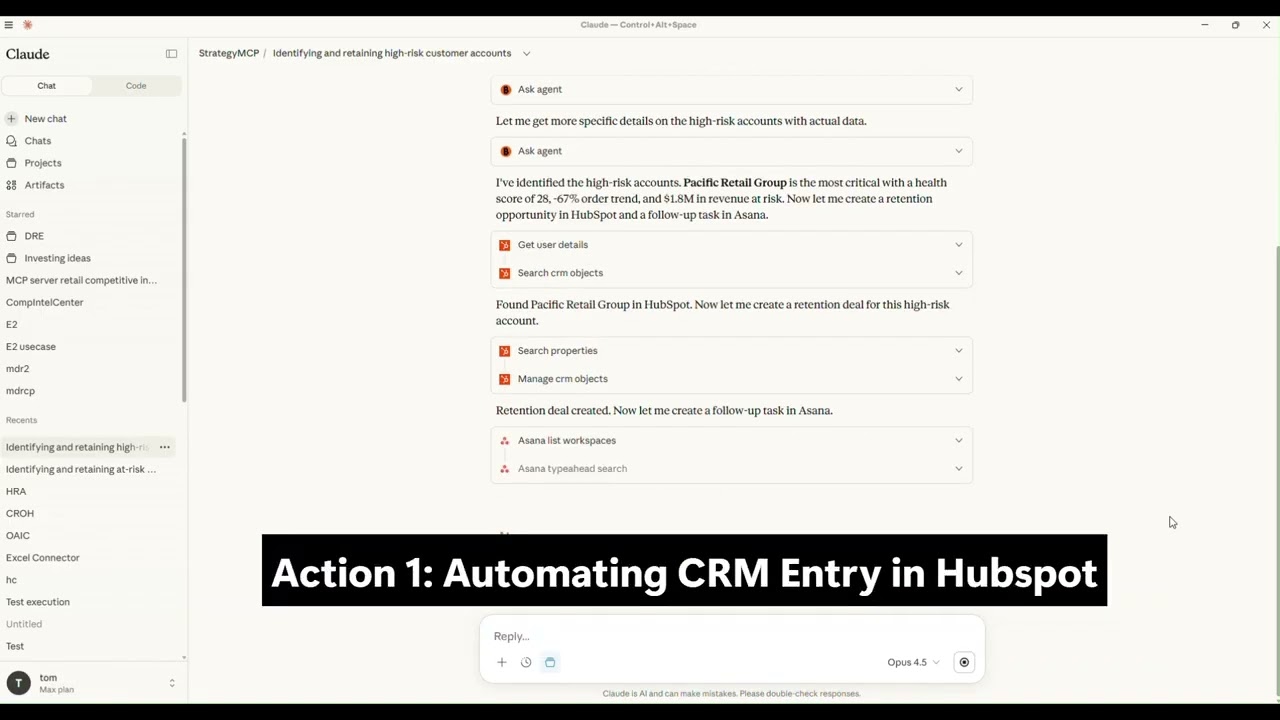
Click to watch the full demo on YouTube
Single prompt → Multiple Strategy queries → 7 enterprise tools updated
"Run my weekly business ops review"
                │
                ▼
    ┌───────────────────────┐
    │   STRATEGY MCP        │──→ HubSpot (deal risk scores, tasks)
    │   (Semantic Layer)    │──→ Jira (blocker issues)
    │                       │──→ Confluence (investigation pages)
    │                       │──→ Asana (LOB tasks)
    └───────────────────────┘
                │
                ▼
    ┌───────────────────────┐
    │   STRATEGY ANALYST    │──→ Slack (executive summary)
    │   (Visual Dashboard)  │──→ Canva (QBR presentation)
    │                       │──→ Figma (dashboard mockup)
    └───────────────────────┘
Option 1: Install from GitHub (when added to a marketplace)
/plugin install enterprise-command-center@your-marketplace
Option 2: Install locally for development
git clone https://github.com/tzockoll-creator/Enterprise-Command-Center-Skill.git
cd Enterprise-Command-Center-Skill
claude --plugin-dir ./
Add the skills/command-center/SKILL.md file to your project knowledge.
enterprise-command-center/
├── .claude-plugin/
│   └── plugin.json          # Plugin manifest
├── skills/
│   └── command-center/
│       └── SKILL.md         # Main skill (auto-invoked by Claude)
├── commands/
│   └── run-review.md        # User command: /enterprise-command-center:run-review
└── README.md
/enterprise-command-center:run-review
Or with customizations:
/enterprise-command-center:run-review Focus on sales pipeline only, post to #sales-leadership
Just ask Claude naturally:
Run my weekly business ops review.
Claude will automatically invoke the skill based on the context.
Run my weekly business ops review.

Focus on:
- Sales pipeline only (skip operations)
- Critical findings only
- Post to #sales-leadership instead of #general
- Skip Figma update
Configure your environment in project instructions:
STRATEGY_MCP_URL: "your-strategy-mcp-endpoint"
STRATEGY_DASHBOARD_URL: "your-strategy-cloud-url"
STRATEGY_DASHBOARD_NAME: "Executive Dashboard"
JIRA_PROJECT_KEY: "DEMO"
CONFLUENCE_SPACE_KEY: "PM"
ASANA_PROJECT_NAME: "Strategy Insights"
SLACK_CHANNEL: "#leadership"
Connect these MCP servers in Claude:
* Strategy MCP
* Asana
* Atlassian (Jira + Confluence)
* HubSpot
* Slack
* Canva
* Figma
MIT License - See LICENSE file for details
Built for demonstrating enterprise AI orchestration capabilities.
Refactor high-complexity React components in Dify frontend. Use when `pnpm analyze-component...
Trigger when the user requests a review of frontend files (e.g., `.tsx`, `.ts`, `.js`). Support...
Generate Vitest + React Testing Library tests for Dify frontend components, hooks, and...
Guide for implementing oRPC contract-first API patterns in Dify frontend. Triggers when creating...
This skill is compatible with the SKILL.md standard and works with all major AI coding agents:
Learn more about the SKILL.md standard and how to use these skills with your preferred AI coding agent.