
Refactor high-complexity React components in Dify frontend. Use when `pnpm analyze-component...

npx skills add yanibu2777/rootly-morning-brief-skill
Or install specific skill: npx add-skill https://github.com/yanibu2777/rootly-morning-brief-skill
Generate and deliver a Rootly morning incident digest for on-call operations. Use when the user asks for a daily Rootly briefing, incident summary, on-call snapshot, overdue action item report, or wants to schedule a cron-based morning ops update to Slack.
name: rootly-morning-brief
description: Generate and deliver a Rootly morning incident digest for on-call operations. Use when the user asks for a daily Rootly briefing, incident summary, on-call snapshot, overdue action item report, or wants to schedule a cron-based morning ops update to Slack.
metadata:
{
"openclaw":
{ "requires": { "env": ["ROOTLY_API_KEY"] }, "primaryEnv": "ROOTLY_API_KEY" }
}
Run scripts/rootly_morning_brief.py to print a short Rootly digest to stdout. OpenClaw cron --announce handles Slack delivery.
The output is phone-friendly by default: one line per item, Slack deep links for drill-down, and --max-items defaults to 3.
ROOTLY_API_KEY: Rootly API key (or a readable secret file fallback)ROOTLY_BASE_URL (default https://api.rootly.com)ROOTLY_TIMEZONE (default America/Toronto)ROOTLY_INCLUDE_PRIVATE (true/false, default false)ROOTLY_API_KEY_FILE (path to a file containing only the API key)ROOTLY_BRIEF_LOG_LEVEL (WARNING default; set to INFO or DEBUG for troubleshooting)ROOTLY_MOCK_DATA_DIR (optional local mock data directory)Manual test:
python3 scripts/rootly_morning_brief.py
Include private incidents (opt-in):
python3 scripts/rootly_morning_brief.py --include-private
Run with local sandbox data (no Rootly account needed):
python3 scripts/rootly_morning_brief.py --mock-data-dir ./mock-data
Machine-readable output:
python3 scripts/rootly_morning_brief.py --json
openclaw cron add \
  --name "Rootly morning brief" \
  --cron "0 8 * * *" \
  --tz "America/Toronto" \
  --session isolated \
  --message "Use rootly-morning-brief. Run scripts/rootly_morning_brief.py and print the full digest." \
  --announce
To pin delivery to a specific Slack channel, add:
- --channel slack --to "channel:CXXXXXXX"
*Rootly Morning Brief* — Sun Mar 15
At a glance: 2 active (1 SEV0/SEV1) · 1 resolved in 24h · 2 on-call now · 1 overdue

*Active now*
• 🚨 <https://root.ly/gsif-3|Global sign-in failures after OIDC key rotation> — [SEV0] · [OPEN] · started Sun 6:42 AM
• 🟧 <https://root.ly/clsf-2|Checkout latency spike during us-east database failover> — [SEV2] · [OPEN] · started Sun 5:25 AM

*On-call now*
• Nicole Bu — L1 primary
• Jordan Patel — L2 secondary

*Overdue actions*
• ⚠️ <https://root.ly/gtb2es|Rotate CI deploy tokens and verify revocation in every production region.> — [P1] · due Sat 7:30 AM · Nicole Bu · SEC-742

*Resolved (24h)*
• <https://root.ly/ubaa-1|Unauthorized bastion access attempt blocked> — resolved Sun 12:02 AM
scripts/rootly_morning_brief.py located in the rootly-morning-brief skill directory; do not reimplement the digest manually.--mock-data-dir is set, run entirely from local mock files.--mock-data-dir is not set, use ROOTLY_API_KEY, then ROOTLY_API_KEY_FILE, then standard OpenClaw secret-file paths.America/Toronto unless the user asks otherwise.OpenClaw skill for a short daily Rootly briefing:
- active incidents
- incidents resolved in the last 24 hours
- who is on-call now
- overdue action items
The script prints the digest to stdout. OpenClaw cron --announce is what delivers that output to Slack.
This repo includes a real 8:00 AM phone delivery screenshot from the RootlyClaw app:
- Output-screenshot.jpg
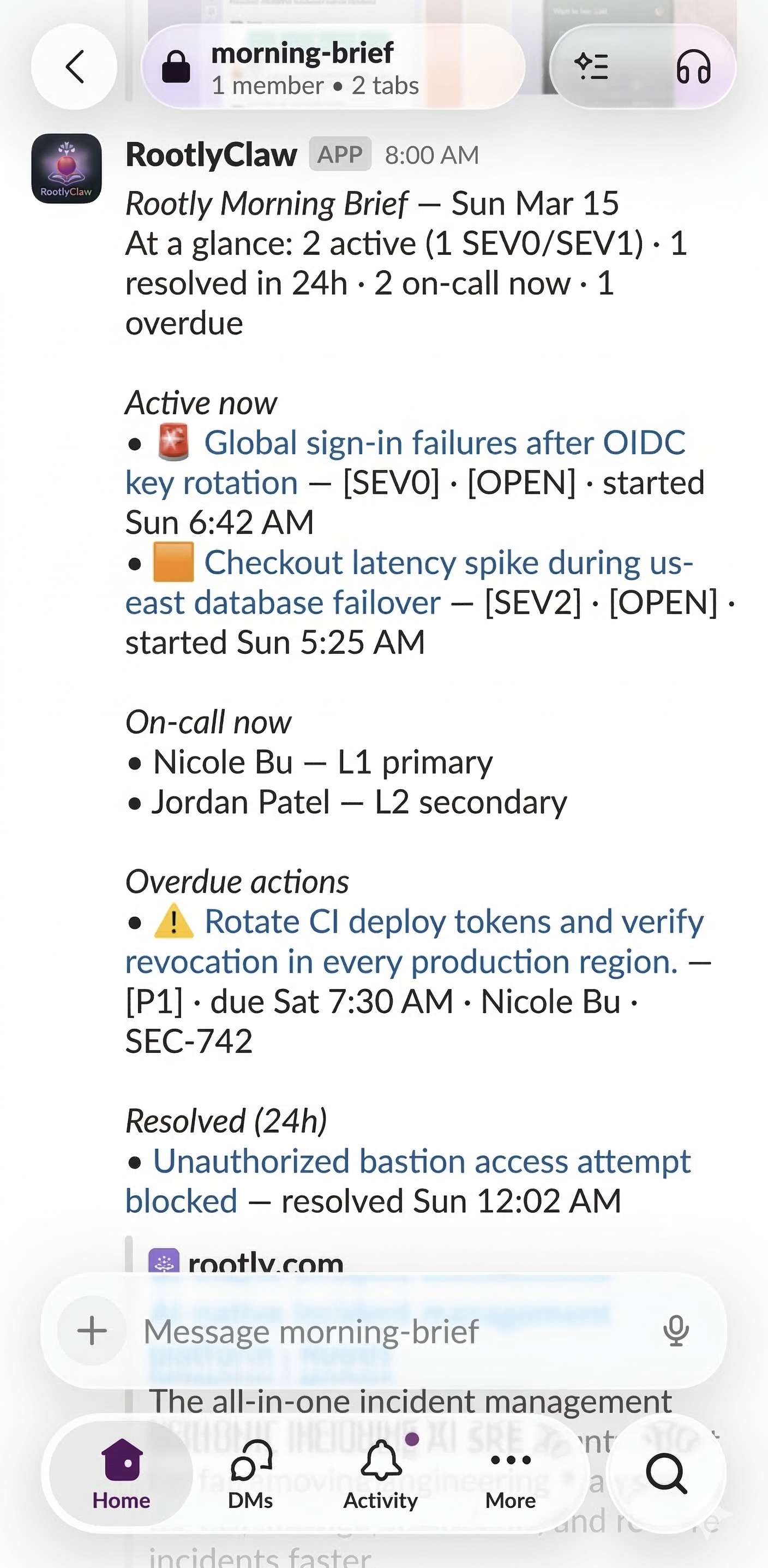
If you run OpenClaw in a sandboxed container, make sure that container includes python3. OpenClaw sandboxing provides isolation, not a built-in Python runtime for skills.
ClawHub:
- Install the ClawHub CLI if you do not have it yet:
npm i -g clawhub
or
pnpm add -g clawhub
clawhub install rootly-morning-brief
By default, clawhub installs into ./skills under your current working directory. If an OpenClaw workspace is configured, it falls back to that workspace and OpenClaw loads the skill from <workspace>/skills.
Manual install:
- Copy this folder to ~/.openclaw/workspace/skills/rootly-morning-brief
- For a named profile, use that profile's workspace instead
You only need this for live Rootly data. Mock-data runs do not need an API key.
Recommended for OpenClaw:
mkdir -p "${OPENCLAW_STATE_DIR:-$HOME/.openclaw}/secrets"
printf '%s\n' 'YOUR_ROOTLY_API_KEY' > "${OPENCLAW_STATE_DIR:-$HOME/.openclaw}/secrets/rootly_api_key"
chmod 600 "${OPENCLAW_STATE_DIR:-$HOME/.openclaw}/secrets/rootly_api_key"
OpenClaw cron jobs do not inherit your shell env, so the secret file is the reliable path.
For temporary manual testing, this also works:
export ROOTLY_API_KEY="YOUR_ROOTLY_API_KEY"
Optional:
export ROOTLY_TIMEZONE="America/Toronto"
export ROOTLY_INCLUDE_PRIVATE="false"
This is the main path for the real daily use case.
Requires the Rootly API key from the section above. If you do not have one yet, skip to Step 2 (mock data).
python3 scripts/rootly_morning_brief.py
Use this when you want to verify formatting without hitting the API.
python3 scripts/rootly_morning_brief.py --mock-data-dir ./mock-data
./mock-data is relative to the skill directory.
The script does not send to Slack by itself. OpenClaw cron --announce captures stdout and sends the briefing.
Start with the simplest path from the current or last chat context:
openclaw cron add \
  --name "Rootly morning brief test" \
  --at "+1m" \
  --delete-after-run \
  --session isolated \
  --light-context \
  --message "Use rootly-morning-brief. Run scripts/rootly_morning_brief.py and print the full digest." \
  --announce
If you want to pin a specific Slack channel instead:
openclaw cron add \
  --name "Rootly morning brief test" \
  --at "+1m" \
  --delete-after-run \
  --session isolated \
  --light-context \
  --message "Use rootly-morning-brief. Run scripts/rootly_morning_brief.py and print the full digest." \
  --announce \
  --channel slack \
  --to channel:C0123456789
If you want the one-time Slack test to use mock data, make the instruction explicit:
openclaw cron add \
  --name "Rootly morning brief test (mock)" \
  --at "+1m" \
  --delete-after-run \
  --session isolated \
  --light-context \
  --message 'Use the `rootly-morning-brief` skill. Run it with mock data from `./mock-data` and print the digest.' \
  --announce
You can wait a minute or force due jobs immediately:
openclaw cron run --due
After the one-time Slack test works, register the real daily job.
The requirements example uses America/New_York. This skill defaults to America/Toronto on purpose because that is the timezone the script and sample data were built around. Change it if your team wants a different local morning window.
Current or last chat context:
openclaw cron add \
  --name "Rootly morning brief" \
  --cron "0 8 * * *" \
  --tz "America/Toronto" \
  --session isolated \
  --light-context \
  --message "Use rootly-morning-brief. Run scripts/rootly_morning_brief.py and print the full digest." \
  --announce
Explicit Slack channel:
openclaw cron add \
  --name "Rootly morning brief" \
  --cron "0 8 * * *" \
  --tz "America/Toronto" \
  --session isolated \
  --light-context \
  --message "Use rootly-morning-brief. Run scripts/rootly_morning_brief.py and print the full digest." \
  --announce \
  --channel slack \
  --to channel:C0123456789
List jobs:
openclaw cron list
Inspect runs for a job:
openclaw cron runs --id <job-id>
Run due jobs right now:
openclaw cron run --due
*Rootly Morning Brief* — Sun Mar 15
At a glance: 2 active (1 SEV0/SEV1) · 1 resolved in 24h · 2 on-call now · 1 overdue

*Active now*
• 🚨 <https://root.ly/gsif-3|Global sign-in failures after OIDC key rotation> — [SEV0] · [OPEN] · started Sun 6:42 AM
• 🟧 <https://root.ly/clsf-2|Checkout latency spike during us-east database failover> — [SEV2] · [OPEN] · started Sun 5:25 AM

*On-call now*
• Nicole Bu — L1 primary
• Jordan Patel — L2 secondary

*Overdue actions*
• ⚠️ <https://root.ly/gtb2es|Rotate CI deploy tokens and verify revocation in every production region.> — [P1] · due Sat 7:30 AM · Nicole Bu · SEC-742

*Resolved (24h)*
• <https://root.ly/ubaa-1|Unauthorized bastion access attempt blocked> — resolved Sun 12:02 AM
title — status/severity/time with one line per item.🚨, 🟥, 🟧) and priority chips ([P1]) on action items.No ... lines instead of hiding empty groups.+N more.cron --announce handles Slack routing./v1/incidents, /v1/oncalls, /v1/action_items are used.References used for formatting decisions:
- Google SRE guidance on actionable alerting and reducing noisy/non-actionable signal: https://sre.google/sre-book/practical-alerting/
- Atlassian incident communication tips (communicate early/often/precisely): https://support.atlassian.com/statuspage/docs/incident-communication-tips/
- Atlassian incident response handbook (short customer updates, explicit impact/next steps): https://www.atlassian.com/incident-management/handbook/incident-response
--announce handles that.This skill is responsible for fetching Rootly data and formatting the briefing. OpenClaw is responsible for chat delivery and cron routing.
Refactor high-complexity React components in Dify frontend. Use when `pnpm analyze-component...
Trigger when the user requests a review of frontend files (e.g., `.tsx`, `.ts`, `.js`). Support...
Generate Vitest + React Testing Library tests for Dify frontend components, hooks, and...
Guide for implementing oRPC contract-first API patterns in Dify frontend. Triggers when creating...
This skill is compatible with the SKILL.md standard and works with all major AI coding agents:
Learn more about the SKILL.md standard and how to use these skills with your preferred AI coding agent.