OpenClaw Skills Installation & Configuration Guide - Step by Step
OpenClaw Skills are modular extensions that teach the AI agent how to interact with external...
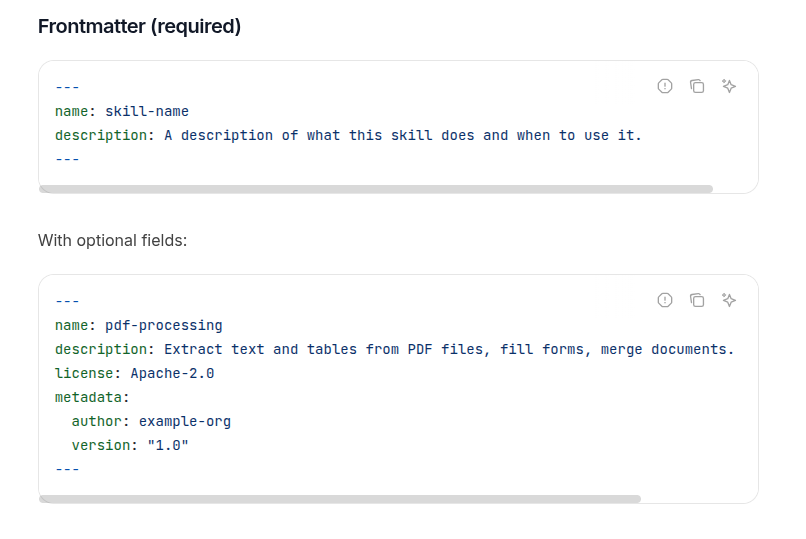
A dead-simple guide to creating Agent Skills - no PhD required.
A dead-simple guide to creating Agent Skills - no PhD required.
Agent Skills are like instruction manuals for AI agents. Think of them as recipe cards that tell an AI how to do specific tasks. That's it.
To create a skill, you need:
my-cool-skill)SKILL.mdThat's literally it.
Create a folder called hello-skill and put this in SKILL.md:
---
name: hello-skill
description: Says hello to people in a friendly way. Use when the user wants a greeting.
---

# Hello Skill

When activated, greet the user warmly and ask how you can help them today.

Example: "Hello! Great to meet you! What can I help you with?"
Done. You just created an Agent Skill.
Here's a practical skill that extracts text from PDFs:
---
name: pdf-extractor
description: Extracts text and tables from PDF files. Use when users need to read, analyze, or process PDF documents.
---

# PDF Text Extractor

## When to use this skill
- User uploads a PDF file
- User asks to "read", "extract", or "analyze" a PDF
- User wants data from a PDF document

## Steps
1. Check that the file is actually a PDF
2. Use a PDF parsing tool to extract text
3. Format the output clearly
4. If tables exist, preserve their structure

## Example
User: "Can you extract the text from this contract?"
Action: Extract all text, format paragraphs clearly, highlight any tables or structured data.
A skill that reviews code for common issues:
---
name: code-reviewer
description: Reviews code for bugs, style issues, and improvements. Use when users ask for code review, feedback, or to check their code.
---

# Code Reviewer Skill

## What this skill does
Reviews code and provides actionable feedback on:
- Bugs and logic errors
- Code style and readability
- Performance issues
- Security concerns

## Process
1. Read the code carefully
2. Identify issues by category
3. Explain each issue simply
4. Suggest specific fixes
5. Highlight what's done well

## Output format
**Bugs:** List any logic errors
**Style:** Note readability issues
**Performance:** Mention slow operations
**Security:** Flag any vulnerabilities
**Good stuff:** Praise good practices

Keep feedback constructive and specific.
Want to include actual code? Create a scripts/ folder:
my-skill/
├── SKILL.md
└── scripts/
    └── process.py
Reference it in your SKILL.md:
Run the processing script:
scripts/process.py input.txt
For longer documentation, create a references/ folder:
my-skill/
├── SKILL.md
└── references/
    └── api-docs.md
Reference it like:
For detailed API information, see [API docs](references/api-docs.md).
For the name:
- Use lowercase letters, numbers, and hyphens only
- Max 64 characters
- Match your folder name
- Good: pdf-processor, code-helper, data-analysis
- Bad: PDF_Processor, -pdf-, pdf--tool
For the description:
- Say what it does AND when to use it
- Max 1024 characters
- Be specific
- Good: "Converts images to different formats (PNG, JPG, WebP). Use when users need to change image file types or optimize images."
- Bad: "Image stuff"
---
name: data-analyzer
description: Analyzes datasets and provides insights. Use when users upload data files or ask for data analysis.
---

# Data Analysis Skill

1. Load the data file
2. Check for missing values or errors
3. Calculate basic statistics
4. Identify patterns or anomalies
5. Present findings clearly with examples
---
name: email-writer
description: Writes professional emails based on user requirements. Use when users need help composing emails.
---

# Email Writer Skill

Ask the user:
- Who is the recipient?
- What's the purpose?
- What tone? (formal, casual, friendly)

Then write a clear email with:
- Appropriate subject line
- Professional greeting
- Clear body with main points
- Polite closing
---
name: debug-helper
description: Helps debug errors in code. Use when users share error messages or broken code.
---

# Debug Helper Skill

1. Ask for the error message if not provided
2. Identify the error type (syntax, runtime, logic)
3. Explain what the error means in plain English
4. Show where the problem is
5. Provide a working fix
6. Explain why it works
references/❌ Too vague: "Helps with files"
✅ Just right: "Converts CSV files to Excel format. Use when users need Excel spreadsheets from CSV data."
❌ Too complex: 20 pages of detailed instructions
✅ Just right: Clear steps, with details in separate reference files
❌ Bad name: My_Awesome_PDF-Tool!!!
✅ Just right: pdf-converter
SKILL.mdThat's it. No frameworks, no build tools, no config hell. Just a folder and a markdown file.
Now go make something useful.
skills-ref tool from the agentskills repositoryRemember: If you can write a README, you can write an Agent Skill. It's literally that simple.